Apple iPhone pros, cons, favorite apps? VS Motorola Droid.

As I said, I own both types of keyboards. The BB wins hands down and is why it is the choice of business professionals that are heavy into e-mail (which we are).

The reason why Apple needs a “correcting application” for their keyboard is because people make a lot of mistakes using it. This is called a clue. :wink:

C4

Wow. I just spent 1.5 hours typing a reply for you all and my PC froze and I lost it all.

I came from a Win Mobile 5.0/5.1 HTC Titan (VX 6800) with a real QWERTY keyboard. I swore I would never get a phone that did not have a keyboard. I lied.

I played a bit with the DROID. It’s ugly, square and unrefined. Give it 6 months, don’t buy that POS Motorola and wait for the next wave of quality HTC phones with Android 2.0 for Verizon.

The ATT network can be fine of you live and travel in an area that happens to be ATT-stronge. Many places are simply not. Verizon, overall has the network that all others are compared to. Period.

The I-Phone is still the king of hardware. Period.

The BlackBerry Storm (or Storm2) is no I-Phone killer, but the network it rides on makes it worth a look.

Android OS based phones are the next up and coming fad. Will they overtake the I-phone? Who knows? Time will tell. Verizon is wanting to at least pull along side the I-phone using the Android hardware, they are putting a massive amount of money into the bet…

HTC released the Imagio (Windows 6.5) 2 weeks prior to the DROID being released. This was a very quite release because Verizon considers Win Mobile to be a business enterprise class phone and not a general consumer class phone. No huge TV marketing campaines, it just floated around the blogs and it appeared on the Verizon site with little hoopla.

I carry the Imagio. I love the Imagio. Within 4 days of going from the Titan to the Imagio, I was just as fast and accurate on the soft keyboard as I was on the titans QWERTY hardware keyboard.

You can compare what I consider to be todays very top Elite phones here:
http://www.infosyncworld.com/reviews/cell-phones/compare/?name1=HTC+Imagio&name2=Motorola+Droid&name3=HTC+Droid+Eris&name4=RIM+BlackBerry+Storm+2&compare=Compare

I came from the HTC Titan, it was an archaic beast, but I loved it!

I am now at the Imagio with a 16GIG mem card and many, many OS tweaks to allow me to have free full feature GPS, play DivX movies, provide a broadband mobile hotspot to multiple laptops at work so we can stream HULU/Netflix/Pandora, play high resolution video games and once in a while… talk on the phone. I admit to using text more than phone… I hate phone calls.

I have 6 email accounts on the Imagio, they get checked automatically every 60 min. Some are my personal company email, some are free-mail accounts like Hotmail/Yahoo.

My 5 mp camera (although there is no flash on the Imagio) is freaking sweet!
Photo taken with my Imagio Cell Phone Outside in cloudy weather:

Photo taken inside the Cabelas animal display:

The battery life gets me from 5AM to 9PM with about 35% battery left. If you use the car charger or plug into a USB port, you will never worry about power even if your a talk-a-holic. I might spend 15-30 min a day on the phone, so I dont need to charge mid day. I watch maybe 1.5 hours of V-Cast (House, Family Guy, American Dad, Bones) and text maybe 30-50 texts a day. Average internet (Opera Mobile) maybe 30 min a day.

I think Android operating system based units will be the up and coming super power, it is my opinion… but I think that the Motorola phone has a super shitty keyboard, nasty camera software (supposedly being fixed Dec 11th with an over air update) and looks that kill… kill the phone. Its ugly, too square and too unrefined.

The HTC line of hardware coming out during the next 4 months will soon make the DROID look like sun dried turds. If your want the stuff that will make you happy long term, hold off a couple months and see what Verizon releases via HTC. I would suspect that an Imagio look-a-like will come with the Android OS, and a HTC Android phone like what is out in Europe right now with it’s MASSIVE screen that supports MULTI-TOUCH just like the I-Phone.

Right now, the DROID does not support multi-touch. Multi Touch is the pinch and spread or spread and pinch gesture with 2 fingers that allows zoom or un-zoom on the I-Phone. Verizon has no Multi-touch enabled phones currently. This should be here by the end of Q1 2010.

Now, this is the Imagio killer, the HTC HD2 with a massive 4.3" screen with multi-touch and a 1000 mhz processor: http://www.htc.com/www/product/hd2/overview.html

I would suspect that after the HTC HD2 comes out, within 1 quarter a Android version should appear.

What do all these wonderfull phones look like? I’ll show ya:

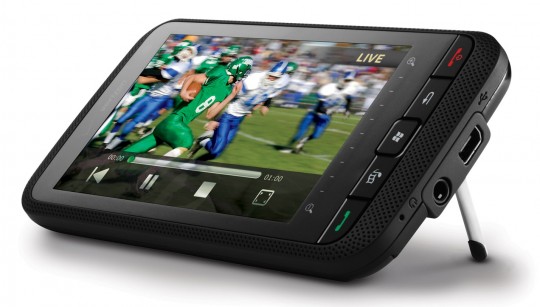
HTC HD2 As the first Windows phone with HTC’s Sense user interface, the HD2 is way more usable than the average Microsofty phone, and it packs some serious features, such as a 4.3-inch, 480x800 capacitive touch screen, HSPA 3G networking, Wi-Fi, Bluetooth 2.1, a 5 megapixel camera with autofocus and a dual LED flashlight, a standard 3.5mm audio jack, microSD storage, GPS, a compass, a 1GHz Snapdragon processor, and more.

HTC Imagio

HTC Android based ERIS

Motorola DROID (Ugly Duckling)

I had an iPhone for over a year, and recently switched to the Droid. Let me start out by saying the iPhone is a great phone. In my opinion it was the best phone you could get for quite a while. There are a number of things about the Droid that I much prefer over the iPhone though, and a few things I think are nicer about the iPhone.

I’ll mention the things I like about the Droid, then the iPhone.

Droid

Screen - The screen is massively better than the iPhone. If you get a chance, hold them side by side and it will be readily apparent. The Droid screen is approximately the same size as the iPhone, but it’s got more than double the resolution. Everything looks fantastic on the Droid. In more practical terms… the higher screen resolution of the Droid allows you to see things where you’d have to zoom on the iPhone to see them clearly. For instance, when viewing the web you can be zoomed further out, allowing you a broader view of the page, and still easily read text. On the iPhone you’ll have to zoom in further to read things. Overall though, the screen on the Droid is just something you have to see. It’s amazing.

Multitasking - On the Droid you can run multiple programs at once. This allows you to listen to an internet radio application while surfing the internet for instance. While the iPhone allows certain apps to run in the background, they’re only ones that Apple has made. So far they’re not allowing any 3rd party apps to run in the background. While it may not seem like a big deal, it also allows programs on the Droid to serve up their own alerts, and gives you far more options to customize your phone. For instance, I have a notes application that I can set to remind me about things. Also, there is a program on the Droid that will run in the background and automatically change your alert profiles (ringtones, volume, etc…) based on where you go. You can define an area like where you work, and when you go there the phone automatically silences itself. There are many location aware programs, and many more that make use of the ability to run in the background, something that Apple does not allow on the iPhone.

Integrated Contacts - The Droid gives you a contact list much like the iPhone, but if you tap on the picture of a contact (or the place where a picture would go in the list) a little menu pops up with all your contact methods for that person. Just choose which one you want, and it goes right to it. This isn’t a killer feature or anything, but it is handy, and it’s very well executed.

Integrated, Voice Searchable, Voice Guided Navigation - This is unbelievably good. Say I’m somewhere unfamiliar, and I want a McDonalds. All I have to do is, from the homescreen, long press the search icon on the phone. A window pops up, and I say “Navigate to McDonalds” It’ll open the navigation program and, if appropriate, give me a list of possible choices (in this case it’ll list all the McDonalds restaurants by distance) I select the one I want, and it’ll plan out a route and automatically give my voice guided turn by turn navigation. If I’m in the Map application already, I can also type in, or say, the name of a place. It’ll find it and then give me the option to navigate there. The voice directions are excellent, and the phone will give you a flying view as you travel your route, with excellent visuals on screen to go with the voice directions. There’s really so much you can do with the map and navigation applications that I can’t get into all of it in any reasonable amount of time. In my opinion, this feature alone is enough to place the Droid ahead of the iPhone, it’s that good. You can get navigation programs for the iPhone, but they’re not free, and they’re not totally integrated into the phone.

Open Source - The open nature of the Droid gives developers so many options when they make software. Like I mentioned before, there are so many things that you can do to customize your phone. They’re not all necessary, but they are nice touches. The Android OS on its own allows me options I didn’t have with the iPhone (different alert sounds for different email accounts, etc…) but the open nature of the development allows for even more customization. If you don’t like the way your onscreen keyboard looks or is laidout, no problem, download a new one. If you want the alert LED on the front of the phone to flash different colors for different notifications, no problem, there’s a program that does that. If you want background images on your desktops that rotate, you can do it. If you want to run location aware widgets on your desktop you’ll have no trouble downloading them from the app market. If you want a totally new SMS program, just download one. Same for email or anything else you can think up. As we all know, the iPhone is solidly under Apple’s control and none of this is allowed unless you jailbreak the phone, even then, you still can’t do all of this.

On Screen Keyboard - I have to say I never use the physical keyboard. I prefer the on screen version. Even here, it’s better than the iPhone. As you type, there is a little bar above the keyboard that gives you various suggestions for words. Tapping one inserts it. The auto-correct on the Droid is excellent, and the option to choose from a list of words as you type is nicer than the iPhone that suggests, at most, a single word as you type.

Combined Inbox - The built in mail client allows you to combine email inboxes. It’s great. Instead of having to shuffle back and forth between accounts, you can display all your email in a single inbox if you wish. It labels each message by with a color depending on which email inbox it’s from.

Flash - This isn’t a feature yet, but the word is it’s coming in January. This will make the web surfing on the Droid, which is already faster and better looking than the iPhone, even better. As far as anyone can tell, Flash on the iPhone is still a long way off as Apple continues to try and exert control over every aspect of the phone. Having flash will make browsing the media-rich webpages even better.

iPhone

App Store - The App Store is still better, and has many more apps than the Android App Market. If you’re the kind of person that really likes having a lot of apps, you’ll find more to like with the iPhone. Personally, the only app I really miss that I can’t get on the Droid is Ballistic. Virtually all of the major apps are represented well on the Android platform, but if you want something more specialized, you still have a better chance of finding it on the iPhone.

Music - I virtually NEVER listen to music on my phone. That said, the music capability of the iPhone through iTunes is much easier to use than the Droid. I really can’t say much here because I really don’t care about it, and never really explored this aspect of either phone, but if you really like listening to music you’ll likely like that feature on the iPhone more.

Ok, that’s all I can think up off the top of my head. If anyone has any more specific questions, please ask. Like I said before, the iPhone is a great phone, I just think that there’s something better on the market now. Keep in mind too that the Droid is the first of the Android 2.0 phones, and before too long there will be more and more that improve on each other’s features and also benefit from what’s learned as time goes on. Apple is going to have a hell of a time keeping up with the pace of Android development as the Android base grows and the major manufacturers make more and more models as hardware improves.

I don’t know if this will help or not but the DROID has a slide out keyboard. I see I missed the bus.

I actually don’t think you can. I have read about 10 reviews/comparison between the IPHONE and DROID. The DROID comes out either on top or a tie.

The GPS capability of this phone kicks any “App” that the IPHONE can come up with. Not to mention beating most all of the standalone GPS units out there! Amazing.

C4

second what Grant said about the roll of the phone. A QWERTY keyboard cannot be beaten when email is the main concern, so my BB is a business tool. My wife can type on the iPhone faster than I anticipated, and the predictive text feature can be handy once you get the hang of it. There are a couple QWERTY KB devices I have seen being developed, which attach themselves to your iphone, it will make it quite a bit thicker of course. As far at&t coverage, I can report nothing but solid in and surrounding areas of houston, dallas, austin.

One other major factor is who your cell service is with… I’m guessing I’ll be locked into corporate AT&T again and will know within the next week. If it goes that way I’ll be trying the new iPhone and if Verizon is the option I’ll be trying out the new Droid as I’ve read Verizon coverage is much better than AT&T.

I love my iPhone. I used to talk so much trash about it, and gave my Dad such grief for buying one. When I went to see him on leave he told me to mess around with it for a week and if I liked it he would buy it for my Christmas gift. Well I was sold on the ride from the airport, but didnt let him know until about day 5.

Service-Ive been very pleased with AT&Ts service thus far. Obviously if I am in a gun mount or missile launcher I wont get service but other than that its good. Ive used it in a number of airports with same results. I knew I had good 3G coverage in my area before I got it.

Web/email-Freaking amazing, I use this feature more than any other incl the phone. The Navy computers block some websites so its nice to be able to email a link to my Yahoo email and check it out. Or buy that super special part when Bravo emails me that its in stock! I use my Yahoo account with it and its plenty good for me, usually do a few dozen emails a day.

Size-Nice and thin, and reasonably light. Im willing to trade a tactile keyboard for the slim profile of the iPhone.

Interface-Its more like a small computer than a phone, so it is much slower to transition to different functions. Like if I wanted to take a picture of a new car I see on the highway, forget it its not fast enough. Whereas a regular cell or BB can just flip open and push a button and you are in business.

Text-Keeps your texts in a chat log format that I actually like. You can delete conversations or individual texts.

MMS-Camera is ok, good enough for what I need and they have picture mesg now so about damn time.

Phone-Hell I hardly use the phone, I seem to have somewhat of a black hole on my couch of all places where I lose calls. No where else does this happen! What crappy luck.

Battery-I can get a solid 2 days out of a full charge which is fine by me for how much I use it. I keep blue tooth and Wifi off, I find this stretches it out quite a bit. GPS KILLS the battery. My buddy who just got a Droid always tells me that he’ll show me his nic nacs later because his battery is dying.

Music-I can hear a song on the radio, Shazam (song finder app) it to find out what it is, then buy it on iTunes. Thats bloody awesome. The music interface isnt as streamlined as an iPod but I dont expect it to be.

Apps-Many good ones out there here are the ones I have,

Shazam-song finder
Urban Spoon- finds restaurants by $, area, or type
Kitco Gold Live- PM price tracking
Amazon/Kindle
eBay
Facebook
Weather Channel
Constitution
Wikipanion
Units (converter)
Fart for free-I think that explains itself

As I said, I know people who like virtual keyboards better. FOR YOU you like the BB better. Fine, personal preference is great.

I know that when I have tried typing on a BB or other micro keyboard I made lots of mistakes too so maybe it is not a “clue”. :wink: Familiarity breeds a certain level of competence and ability.

Thanks for the review! Your comments seem to be inline with all the articles I have read.

One of the big things when picking a phone is the network! At&T’s network just flat out sucks. They couldn’t PAY me to be on their network! Nuff said.

C4

Most people have never spent any real time with a BB so of course they like the touch screens better. No one I know that has spent a lot of time with each will choose the touch screen.

C4

I will. I’ve had a work issued BlackBerry for the last 2 years, as well as a personally owned iPhone for the same duration. I’m way faster on the iPhone. I see NOTHING to recommend the BB over the iPhone, unless the iPhone is not an option due to carrier choice.

The company I worked for for the past 8 years paid me to use the AT&T network :smiley: It may not be the best, depending on area, but OCONUS it has the best coverage that I’ve found when compared to other Americans I was working with.

EDIT: Mostly I’m referring to Central & South America when referencing OCONUS as I didn’t have any Americans to compare AT&T with in Asia. In SA it flat out kicked ass over the competitors.

Not trying to break into an opinion based pissing match, but I also thought from my 3 year life with the VX6800 (HTC Titan) and it’s hard keyboard… that there would never be a touch phone that could sate my need for physical keys… until I tried it. I got my Imagio and promied myself 1 week before I returned it and went to a Touch Pro (Both physical and touch screen keyboards, similar to your Droid.). After about 2 days I was disgusted. I screwed up everything I tried to type and spent more time backspacing then typing. By the end of day 4… something magical happened… I was starting to get it! I had mysteriously learned how to touch the thing and it started reacting to me. We were forming a new relationship! Now… PISH! You couldn’t force me to take a keyboard phone on a bet!

So, what am I trying to say…? You just have to give yourself a bit of time to work through the begining stress of changing what you once thought was the only way it could be. You learn how to properly work your new hardware, and before long your in love anew and you think nothing else will ever make you feel like you do today! Be it an Eris, a Droid, an Imagio… or even the evil-doer I-Phone… whatever it is… you will learn to love it.

BTW Grant… My Imagio can beat up your robot phone. Naa-na-naa-na-naaaa–na!

I think it also depends on how many e-mails you do a day. I am a HEAVY e-mailer (like 200 a day). So the BB is the way to go IMHO and is why it IS the choice for business use (integration into the BB network, E-mail exchanger server interface, security, etc).
We also forget that texting in the BB network is free and unlimited. I use this A LOT.

The BB cannot compete with just about anything else (in regards to the IPHONE).

C4

I’d gladly let them pay me to be on their network. I am not in SanFran, NYC, or other area where they do suck and it works great. Better than T-Mobile ever did when I had them (in this same area). Everywhere I’ve roamed to has worked just fine as well. Again, I did not roam to SanFran (when I was there I was on T-Mobile and it was pre-iPhone era), NYC, Boston, or other chokepoint.

LOL, I like the pic!

I think people can like SOME of the touch keyboards and I know that I use the one on my IPOD touch a lot. Speed wise though, there is just no comparison in my book.

I will eventually have to go with a touchscreen as the newer versions of the DROID that are coming out interest me greatly.

C4

OCONUS you are working with whomever the local GSM/WCDMA provider is that AT&T or whoever has a relationship with. Both T-Mobile USA and AT&T seem to have relationships with most of the GSM world.

I have used T-Mobile in Germany and in Japan (3G) without issue on various local providers. I did have trouble in S Korea (3G) where supposedly it was supposed to work.

AT&T I have had no trouble in S Korea (3G) and in Japan (3G). (Both DOCOMO and SoftBank/Vodaphone/Jphone though SoftBank, the Japanese iPhone provider, gave me some trouble trying to use data where DOCOMO worked fine)

Of course you pay through the nose for the privilege…

One problem with T-Mobile USA though. Their 3G service in the USA is on a weird proprietary frequency band so OCONUS you want to make sure your T-Mobile phone has normal 2100mhz WCDMA as well as their proprietary one or else you won’t get 3G coverage

It does depend on where you are. AT&T would be about my last choice where I live.

Verizon typically wins with the best CS and coverage (which is what I use and love).

C4

I have no problems with the AT&T network here in DFW - it works (and I’ve got 3G coverage everywhere I go around here), but there’s better networks out there for sure.

As for the keyboard argument - I send emails all day long and spent years on the BB before switching to the iPhone and I love the virtual keyboard. I don’t miss the physical keyboard at all and I am much, much faster on the virtual than I ever was on the physical. Either way you slice it you’re going to have small buttons on a phone and my fat fingers hit multiple buttons whether physical or virtual - so the auto correct helps me a whole lot.

That said, Apple likes to force compliance and/or specific usage on many of their products (don’t get me wrong - I’m a video director/editor and I spend 15 hours + every day on Apple products and for the most part love them) and for me to get the functionality out of the iPhone that I wanted, I had to jailbreak it.